Packet Tracer Forward Broadcast Messages on a Router Example
Table of Contents
If you’ve been trying to figure out how to packet tracer forward broadcast messages on a router example, you’ve probably hit a wall.
You type the command.
You follow the textbook.
And then… nothing works.
That’s not your fault.
There’s a hidden limitation inside Cisco Packet Tracer that almost nobody explains clearly — and it’s exactly why your lab keeps failing.
So instead of wasting hours trying commands that don’t exist, let’s walk through a real, working example that demonstrates the concept of forwarding broadcast messages on a router inside Packet Tracer.
This is the version that actually works — and more importantly, the version that helps you understand what’s really going on.
Why Forwarding Broadcast Messages Is Confusing in Packet Tracer
In real Cisco networking, routers can forward broadcast traffic under certain conditions.
But here’s the catch:
By default, routers do not forward broadcasts. This is intentional. It prevents things like broadcast storms and amplification attacks.
There is a feature called directed broadcast, which allows forwarding packets sent to addresses like:
192.168.1.255
The biggest issue with any packet tracer forward broadcast messages on a router example is that the expected behavior differs from real Cisco IOS.
So when you try to configure:
ip directed-broadcast
You’ll notice something frustrating:
The command either doesn’t exist… or does nothing.
That’s the moment where most people think they’re doing something wrong.
But you’re not.
This is exactly why many learners struggle to complete a working packet tracer forward broadcast messages on a router example in their labs.
To build a working packet tracer forward broadcast messages on a router example, we need to use a method that Packet Tracer actually supports.
The Working Approach: Using DHCP Relay (ip helper-address)
If you want a packet tracer forward broadcast messages on a router example that actually works, you need to use a different mechanism:
DHCP relay via ip helper-address
This may be the only reliable way in Packet Tracer to simulate a router forwarding broadcast traffic.
Here’s why:
A DHCP request is a broadcast packet.
The router receives it and then forwards it as a unicast packet to another network.
That transformation is the key.
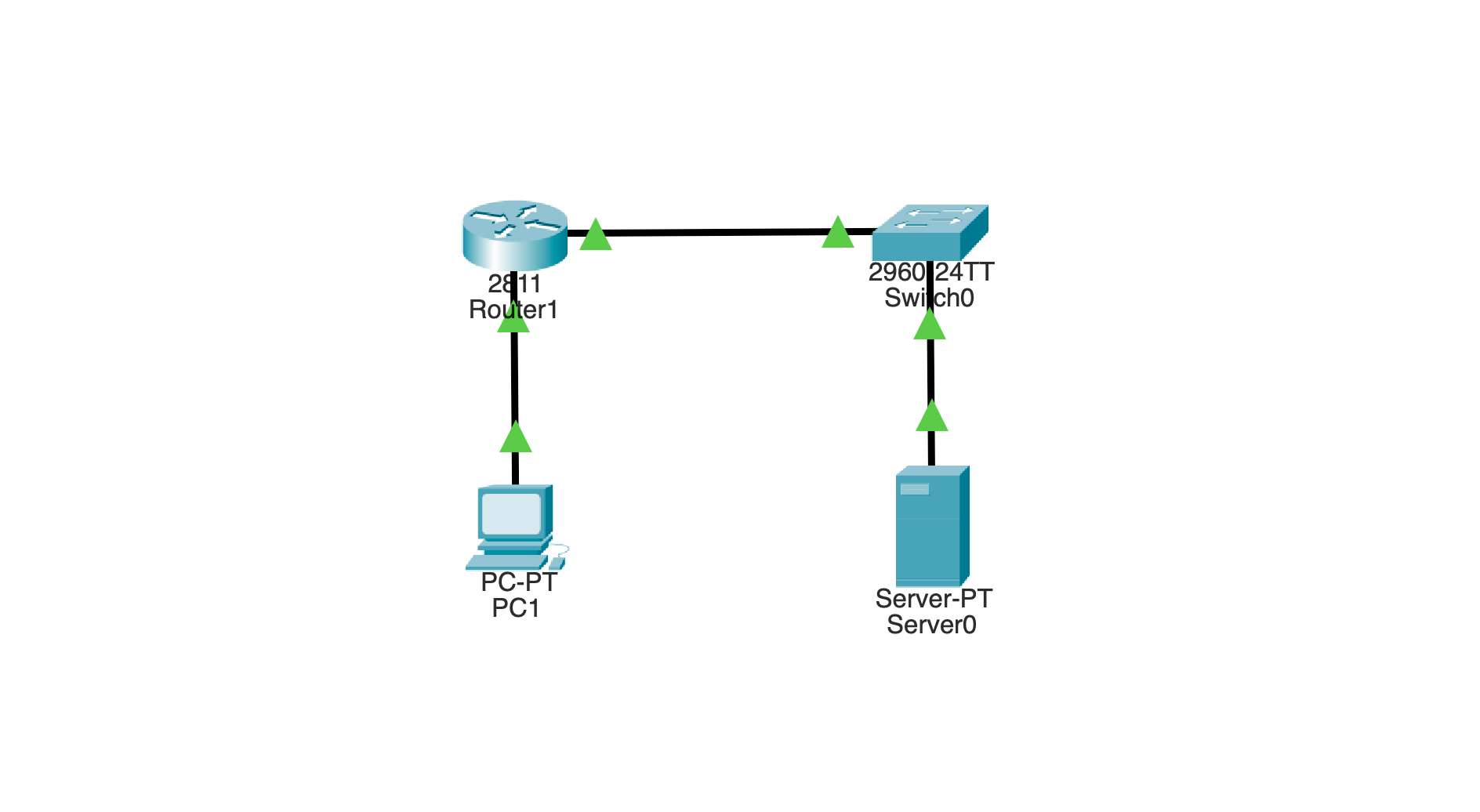
The Lab Topology
You only need four devices:
- One PC (client)
- One router
- One switch
- One server (DHCP server)
The layout looks like this:
PC1 ---- Router ---- Switch ---- Server

You’ll create two networks:
- 10.0.0.0/24 → where the broadcast starts
- 192.168.1.0/24 → where the server lives
Step 1: Configure the Router Interfaces
Start by setting up the router so it connects both networks.
enable
configure terminalinterface g0/0
 ip address 10.0.0.1 255.255.255.0
 no shutdowninterface g0/1
 ip address 192.168.1.1 255.255.255.0
 no shutdown
Now the router knows both networks.
Step 2: Enable Broadcast Forwarding Behavior
Here’s the key part of this packet tracer forward broadcast messages on a router example.
On the interface connected to the PC network:
interface g0/0
 ip helper-address 192.168.1.10
This tells the router:
“If you see a broadcast here, forward it to that server.”
That’s the entire magic.
Step 3: Configure the Server
On the server:
- IP address:
192.168.1.10 - Subnet mask:
255.255.255.0 - Default gateway:
192.168.1.1
Then go to:
Services → DHCP
Create a pool:
- Network:
10.0.0.0 - Default gateway:
10.0.0.1 - Start IP:
10.0.0.100 - Subnet mask:
255.255.255.0
Turn the DHCP service ON.
Step 4: Trigger the Broadcast
Now go to PC1:
- Desktop → IP Configuration
- Click DHCP
At this exact moment, PC1 sends a broadcast packet:
255.255.255.255
What Happens Behind the Scenes
This is where everything clicks.
The router receives the broadcast and checks:
Do I have a destination ip address configured for UDP?
Yes.
So instead of forwarding the broadcast, it:
- Drops the broadcast packet
- Converts it into a unicast packet
- Sends it to
192.168.1.10
The server responds, and the process completes.
Even if you don’t care about the IP assignment, what matters is this:
👉 The router forwarded a broadcast-triggered message across networks
How to Visually Confirm It (The “Aha” Moment)
Switch Packet Tracer into Simulation Mode.
Now repeat the DHCP relay.
Watch closely:
- You’ll see a broadcast leave PC1
- The router receives it
- Then a new packet leaves the router toward the server
- PC1 will receive an Apippa address since it will not receive a response from the server on the 192.168.1.0 network.
That transformation is exactly what you were trying to prove.
Why Ping Doesn’t Work for This
Many people try:
ping 255.255.255.255
Or:
ping 192.168.1.255
And expect it to cross the router.
It won’t.
Here’s why:
- Ping uses ICMP, not UDP
ip helper-addressonly forwards UDP unicasts.- Directed broadcast (needed for
.255) isn’t supported in Packet Tracer
So the router simply drops it.
The Big Takeaway
If you’re searching for a packet tracer forward broadcast messages on a router example, here’s the truth:
You are not actually forwarding a broadcast directly.
You are:
- Intercepting a broadcast
- Dropping the broadcast.
- Converting it into unicast
- Forwarding it to another network
And that’s exactly what Cisco expects you to understand for CCNA.
Final Thoughts
It’s easy to get stuck thinking Packet Tracer is broken or that you’re missing something.
But once you understand the limitation, everything makes sense.
You’re not doing it wrong.
You just needed the right example.
And now you’ve got one that works, one that you can see in simulation, and one that actually teaches the concept behind forwarding broadcast messages on a router.
This simple topology is perfect for demonstrating a packet tracer forward broadcast messages on a router example without unnecessary complexity.